Looking for ABAP interview questions? You have come to THE RIGHT place. I have planned to
continuously update this blog post. So if you have been appearing for interviews recently , share your experiences in the comments below:
Let’s make this list count and add some value to everyone.
All the best for your interview preparation . J Here you go!!
continuously update this blog post. So if you have been appearing for interviews recently , share your experiences in the comments below:
Let’s make this list count and add some value to everyone.
All the best for your interview preparation . J Here you go!!
SAP ABAP interview questions:
Important
Question 1: What is the difference between User Exit and Function Exit?
User Exit
|
Customer Exit
|
User exit is implemented in the form of a Subroutine i.e. PERFORM xxx.
Example: INCLUDE MVF5AFZZ à PERFORM userexit_save_document_prepare. |
A customer exit can be implemented as:
· Function exit
· Screen Exit
· Menu Exit
· Field Exit
Example: CALL Customer function ‘xxx’
INCLUDE xxx. You modify this include. |
In case of a PERFORM, you have access to almost all the data. So you have better control, but more risk of making the system unstable.
|
You have access only to the importing, exporting, changing and tables parameter of the Function Module. So you have limited access to data.
|
User exit is considered a modification and not an enhancement.
|
A customer exit is considered an enhancement.
|
You need Access Key for User Exit.
|
You do not need access key.
|
Changes are lost in case of an upgrade.
|
Changes are upgrade compatible.
|
User exit is the earliest form of change option offered by SAP.
|
Customer exits came later and they overcome the shortcomings of User Exit.
|
No such thing is required here.
|
To activate a function exit, you need to create a project in SMOD and activate the project.
|
What is the difference between RFC and BAPI?
BAPI
|
RFC
|
Just as Google offers Image/Chart/Map APIs OR Facebook offers APIs for Comment/Like, SAP offers APIs in the form of BAPIs. BAPI is a library of function modules released by SAP to the public so that they can interface with SAP.
|
RFC is nothing but a remote enabled function module. So if there is a Function Module in SAP system 1 on server X , it can be called from a SAP system 2 residing on server Y.
|
There is a Business Object Associated with a BAPI. So a BAPI has an Interface, Key Field, Attributes, Methods, and Events.
|
No Business Object is associated with a RFC.
|
Outside world (JAVA, VB, .Net or any Non SAP system) can connect to SAP using a BAPI.
|
Non–SAP world cannot connect to SAP using RFC.
|
Error or Success messages are returned in a RETURN table.
|
RFC does not have a return table.
|
Question 3:What is the difference between SAPSCRIPT and SMARTFORM?
SAPSCRIPT
|
SMARTFORM
|
SAPSCRIPT is client dependent.
|
SMARTFORM is client independent.
|
SAPSCRIPT does not generate any Function module.
|
SMARTFORM generates a Function Module when activated.
|
Main Window is must.
|
You can create a SMARTFORM without a Main Window.
|
SAPSCRIPT can be converted to SMARTFORMS. Use Program SF_MIGRATE.
|
SMARTFORMS cannot be converted to SCRIPT.
|
Only one Page format is possible
|
Multiple page formats are possible.
|
Such thing is not possible in SCRIPT.
|
You can create multiple copies of a SMARTFORM using the Copies Window.
|
PROTECT … ENDPROTECT command is used for Page protection.
|
The Protect Checkbox can be ticked for Page Protection.
|
The way SMARTFORM is developed and the way in which SCRIPT is developed is entirely different. Not listing down those here. That would be too much.
Question 4:What is the difference between Call Transaction Method and the Session method ?
Session Method
|
Call Transaction
|
Session method id generally used when the data volume is huge.
|
Call transaction method is when the data volume is low
|
Session method is slow as compared to Call transaction.
|
Call Transaction method is relatively faster than Session method.
|
SAP Database is updated when you process the sessions. You need to process the sessions separately via SM35.
|
SAP Database is updated during the execution of the batch input program.
|
Errors are automatically handled during the processing of the batch input session.
|
Errors should be handled in the batch input program.
|
Question 5: What is the difference between BDC and BAPI?
BAPI
|
BDC
|
BAPI is faster than BDC.
|
BDC is relatively slower than BAPI.
|
BAPI directly updates database.
|
BDC goes through all the screens as a normal user would do and hence it is slower.
|
No such processing options are available in BAPI.
|
Background and Foreground processing options are available for BDC.
|
BAPI would generally used for small data uploads.
|
BDCs would be preferred for large volumes of data upload since background processing option is available.
|
For processing errors, the Return Parameters for BAPI should be used.This parameter returns exception messages or success messages to the calling program.
|
Errors can be processed in SM35 for session method and in the batch input program for Call Transaction method.
|
Question 6: What is the difference between macro and subroutine?
Macro
|
Subroutine
|
Macro can be called only in the program it is defined.
|
Subroutine can be called from other programs also.
|
Macro can have maximum 9 parameters.
|
Can have any number of parameters.
|
Macro can be called only after its definition.
|
This is not true for Subroutine.
|
A macro is defined inside:
DEFINE … …. END-OF-DEFINITION. |
Subroutine is defined inside:
FORM ….. ….. ENDFORM. |
Macro is used when same thing is to be done in a program a number of times.
|
Subroutine is used for modularization.
|
Question 7: What is the difference between SAP memory and ABAP memory?
SAP Memory
|
ABAP Memory
|
When you are using the SET/GET Parameter ID command, you are using the SAP Memory.
|
When you are using the EXPORT IMPORT Statements, you are using the ABAP Memory.
|
SAP Memory is User Specific.
What does this mean?àThe data stored in SAP memory can be accesses via any session from a terminal. |
ABAP Memory is User and Transaction Specific.What does this mean?à The data stored in ABAP memory can be accessed only in one session. If you are creating another session, you cannot use ABAP memory.
|
Important
Question 8: What is the difference between AT SELECTION-SCREEN and AT SELECTION-SCREEN OUTPUT?
AT SELECTION-SCREEN is the PAI of the selection screen whereas
AT SELECTION-SCREEN OUTPUT is the PBO of the selection screen.
Question 9: What is the difference between SY-INDEX and SY-TABIX?Question 8: What is the difference between AT SELECTION-SCREEN and AT SELECTION-SCREEN OUTPUT?
AT SELECTION-SCREEN is the PAI of the selection screen whereas
AT SELECTION-SCREEN OUTPUT is the PBO of the selection screen.
Remember it this way à TABIX = Table.
So when you are looping over an internal table, you use SY-TABIX.
When you use DO … ENDDO / WHILE for looping, there is no table involved.
So you use SY-INDEX.
For READ statement, SY-INDEX is used.
Question 10: What is the difference between VIEW and a TABLE?A table physically stores data.
A view does not store any data on its own. It can contain data from multiple tables and it just accesses/reads data from those tables.
Question 11: What is the difference between Customizing and Workbench request?A workbench request is client independent whereas a Customizing request is client dependent.
Changes to development objects such as Reports, Function Modules, Data Dictionary objects etc. fall under Workbench requests.
Changes in SPRO / IMG that define system behavior fall under customizing requests.
An example would be ‘defining number ranges’ in SPRO.
In short, generally a developer would end up creating a Workbench request and a Functional Consultant would create a Customizing request.

Question 12: What is the difference between PASS BY VALUE and PASS BY REFERENCE?These concepts are generally used for Function modules or Subroutines etc. and their meaning can be taken literally.
Say we are passing a variable lv_var:
CALL FUNCTION 'DEMO_FM'
EXPORTING
VAR = lv_var.
When we PASS lv_var by VALUE , the actual value of lv_var is copied into VAR.
When we PASS lv_var by REFERENCE , the reference or the memory address of lv_var is passed to the Function module. So VAR and lv_var will refer to the same memory address and have the same value.
Question 13: What is the difference between Master data and Transaction data?Master data is data that doesn’t change often and is always needed in the same way by business.
Ex: One time activities like creating Company Codes, Materials, Vendors, Customers etc.
Transaction data keeps on changing and deals with day to day activities carried out in business.
Transactions done by or with Customers, Vendors, and Materials etc. generate Transaction Data. So data related to Sales, Purchases, Deliveries, Invoices etc. represent transaction data
Some important transactions here for Master Data:
Material: MM01 MM02 MM03
Vendor: XK01 , XK02 , XK03
Customer: Xd01 , XD02 , XD03
Some Important transactions for Transaction data:
Purchase Order: ME21n , ME22n , ME23n
Sales Order: VA01 , VA02 , VA03
Goods Receipt: MIGO
Invoices: MIRO
Important
Question 14: What will you use SELECT SINGLE or SELECT UPTO 1 ROWS ?
Question 14: What will you use SELECT SINGLE or SELECT UPTO 1 ROWS ?
What will you use SELECT SINGLE or SELECT UPTO 1 ROWS ?
There is great confusion over this in the SAP arena.
If you Google, you will see lots of results that will say SELECT SINGLE is faster and efficient than SELECT UPTO 1 ROWS.
But that is 100% incorrect.
SELECT UPTO 1 ROWS is faster than SELECT SINGLE.
If for a WHERE condition, only one record is present in DB, then both are more or less same.
However, If for a WHERE condition multiple records are present in DB, SELECT UPTO 1 ROWS will perform better than SELECT SINGLE.
There is great confusion over this in the SAP arena.
If you Google, you will see lots of results that will say SELECT SINGLE is faster and efficient than SELECT UPTO 1 ROWS.
But that is 100% incorrect.
SELECT UPTO 1 ROWS is faster than SELECT SINGLE.
If for a WHERE condition, only one record is present in DB, then both are more or less same.
However, If for a WHERE condition multiple records are present in DB, SELECT UPTO 1 ROWS will perform better than SELECT SINGLE.
Question 15: What is the difference between .Include Structure and .Append structure?
I have seen ridiculous answers for this at many places on the Web.
The true answer is this:
Let’s say you want to use the Structure X in your table Y.
With .Include X, you can include this structure in multiple tables.
With .Append X, you specify that structure X has been used in table Y and that this cannot be used in any other table now. So you restrict structure X only to Table Y.
The true answer is this:
Let’s say you want to use the Structure X in your table Y.
With .Include X, you can include this structure in multiple tables.
With .Append X, you specify that structure X has been used in table Y and that this cannot be used in any other table now. So you restrict structure X only to Table Y.
Important
Question 16: Can you describe the events in ABAP?
Question 16: Can you describe the events in ABAP?
LOAD-OF-PROGRAM:
INITIALIZATION: If you want to initialize some values before selection screen is called
AT SELECTION SCREEN OUTPUT: PBO for Selection Screen
AT SELECTION SCREEN: PAI for Selection Screen
START-OF-SELECTION
END-OF-SELECTION
TOP-OF-PAGE
END-OF-PAGE
AT USER-COMMAND: When user click on say buttons in application toolbar. SY-UCOMM
AT LINE SELECTION: Double click by user on basic list. SY-LISEL
AT PF##: When User Presses any of the Function Keys
TOP-OF-PAGE DURING LINE SELECTION
Question 17:
What events do you know in Module Pool Programming?
PBO: you know this . If not you should know this . That's basic.
PAI: You know this. If not you should know this . That's basic.
POV: Process on Value request … i.e. when you press F4.
POH: Process on help request … i.e. when you press F1.
Question 18: Can you show multiple ALVs on a Single Screen?
Yes, there are multiple ways of doing this:
Yes, there are multiple ways of doing this:
· If you are using OOALV, you can create multiple custom containers
(cl_gui_custom_container) & put an ALV control (cl_gui_alv_grid) in each of those.
(cl_gui_custom_container) & put an ALV control (cl_gui_alv_grid) in each of those.
· You can even use a Splitter container control and place multiple ALVs in each of
the split container.
the split container.
· If you are using Normal ALV, You can use the following FMS:
1. REUSE_ALV_BLOCK_LIST_INIT
2. REUSE_ALV_BLOCK_LIST_APPEND
3. REUSE_ALV_BLOCK_LIST_DISPLAY
Question 19: A system has two clients 100 and 500 on the same application server. If you make changes to a SAPSCRIPT on client 100, will the changes be available in client 500?
No. SAPSCRIPT is client dependent. You will have to transport changes from client 100 to client 500. However, for SMARTFORMS, Changes will be made both for client 100 and client 500.
No. SAPSCRIPT is client dependent. You will have to transport changes from client 100 to client 500. However, for SMARTFORMS, Changes will be made both for client 100 and client 500.
Question 20: There are 1000’s of IDOCs in your system and say you no longer need some of them? How will you get rid of those IDOCs?
One way is to archive the IDOCs using transaction SARA.
But what the interviewer was expecting was ‘How do you change IDoc Status’?
There are different ways of doing this:
One way is to archive the IDOCs using transaction SARA.
But what the interviewer was expecting was ‘How do you change IDoc Status’?
There are different ways of doing this:
A) Use FM IDOC_STATUS_WRITE_TO_DATABASE
B) USE FMs:
EDI_DOCUMENT_OPEN_FOR_PROCESS and
EDI_DOCUMENT_CLOSE_PROCESS
Question 21: What is the difference between CHAIN … ENDCHAIN and FIELD commands in Module Pool?
If you want to validate a single field in Module Pool, you use the FIELD Command.
On error, this single filed is kept open for input.
If you however want to validate multiple fields, you can use the CHAIN … ENDCHAIN command. You specify multiple fields between CHAIN and ENDCHAIN.
On error, all fields between CHAIN …… ENDCHAIN are kept open for input.
EDI_DOCUMENT_OPEN_FOR_PROCESS and
EDI_DOCUMENT_CLOSE_PROCESS
Question 21: What is the difference between CHAIN … ENDCHAIN and FIELD commands in Module Pool?
If you want to validate a single field in Module Pool, you use the FIELD Command.
On error, this single filed is kept open for input.
If you however want to validate multiple fields, you can use the CHAIN … ENDCHAIN command. You specify multiple fields between CHAIN and ENDCHAIN.
On error, all fields between CHAIN …… ENDCHAIN are kept open for input.
Question 22: What are the types of Function Modules? What is an UPDATE function module?There are three types of Function Modules: Normal , RFC , UPDATE.

The aim of the Update function module is either to COMMIT all changes to database at once or to ROLLBACK all the changes. By definition, an update function module is used to bundle all the updates in your system in one LUW (logical unit of work).
This FM is called whenever COMMIT WORK statement is encountered in the calling program and the way you call it is CALL FUNCTION XXX IN UPDATE TASK.
Have a look at FM EDI_DOCUMENT_CLOSE_PROCESS_UPD and do a where used.
This FM is used as Update FM in case you make changes to IDoc contents/status via your program.
Question 23: How is the table sorted when you do not specify field name and Ascending or Descending? On what criteria will the table be sorted? Do internal table have keys?
Yes, internal table have keys.
The default key is made up of the non-numeric fields of the table line in the order in which they occur.
Question 24: Explain what is a foreign key relationship?Explain this with the help of an example.
Let’s discuss about tables EKKO (PO header) and EKPO (PO line item).
Can you have an entry in table EKPO without having an entry in table EKKO?
In other words can you have PO line items without the PO header?
How does this happen? The answer is foreign key relationship.
So foreign keys come into picture when you define relationship between two tables.

Foreign keys are defined at field level.
Check the foreign key relation for field EBELN of table EKPO.
The check table is EKKO. This just means that whenever an entry is made in EKPO, it is checked whether the entered value for EBELN already exists in EKKO. If not, entry cannot be made to EKPO table.

Question 26: How do you find BAPI?Approach1:
You can go to Transaction BAPI and then search for your desired object.
Say you want to find a BAPI for creating users in the system, in such case you can search for the ‘User’ and find the relevant BAPIs.
Approach2:
Another way is to find a Business Object. Say you want to find a BAPI for creating Material in SAP and you know the BO for Material is BUS1001006. You can go to Transaction SWO1 and enter the BO BUS1001006 in the BOR. Then have a look at the methods for this BO.

This FM is called whenever COMMIT WORK statement is encountered in the calling program and the way you call it is CALL FUNCTION XXX IN UPDATE TASK.
Have a look at FM EDI_DOCUMENT_CLOSE_PROCESS_UPD and do a where used.
This FM is used as Update FM in case you make changes to IDoc contents/status via your program.
Question 23: How is the table sorted when you do not specify field name and Ascending or Descending? On what criteria will the table be sorted? Do internal table have keys?
Yes, internal table have keys.
The default key is made up of the non-numeric fields of the table line in the order in which they occur.
Let’s discuss about tables EKKO (PO header) and EKPO (PO line item).
Can you have an entry in table EKPO without having an entry in table EKKO?
In other words can you have PO line items without the PO header?
How does this happen? The answer is foreign key relationship.
So foreign keys come into picture when you define relationship between two tables.
Foreign keys are defined at field level.
Check the foreign key relation for field EBELN of table EKPO.
The check table is EKKO. This just means that whenever an entry is made in EKPO, it is checked whether the entered value for EBELN already exists in EKKO. If not, entry cannot be made to EKPO table.
Question 25 : What is the difference between a value table and a check table?Check table is maintained when you define foreign key relationships.
For Check table, read question above.
.
At a domain level, you can mention allowed values in the form of:
1) Single values
2) Ranges
3) Value tableFor example, have a look at domain SHKZG. Only allowed values are S and H for Debit/Credit indicator. Whenever and wherever you use this domain, the system will force you to use only these two values: S and H.
Another example is domain MATNR. For this domain the value table is MARA.
So whenever and wherever, you use this domain the system will force you to use values for MATNR in table MARA.
For Check table, read question above.
.
At a domain level, you can mention allowed values in the form of:
1) Single values
2) Ranges
3) Value tableFor example, have a look at domain SHKZG. Only allowed values are S and H for Debit/Credit indicator. Whenever and wherever you use this domain, the system will force you to use only these two values: S and H.
Another example is domain MATNR. For this domain the value table is MARA.
So whenever and wherever, you use this domain the system will force you to use values for MATNR in table MARA.
Question 26: How do you find BAPI?Approach1:
You can go to Transaction BAPI and then search for your desired object.
Say you want to find a BAPI for creating users in the system, in such case you can search for the ‘User’ and find the relevant BAPIs.
Approach2:
Another way is to find a Business Object. Say you want to find a BAPI for creating Material in SAP and you know the BO for Material is BUS1001006. You can go to Transaction SWO1 and enter the BO BUS1001006 in the BOR. Then have a look at the methods for this BO.
Important
Question 27: How do you find BADI?
Approach1:
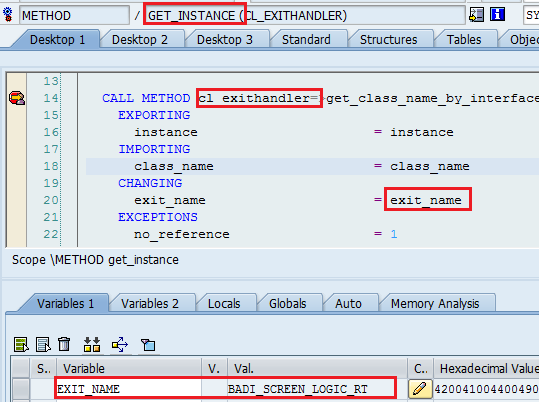
Go to Class CL_EXITHANDLER in SE24 ---> Put a breakpoint in method GET_INSTANCE.Now go and execute your transaction code for which you want to find BADI.
You will find the BADI in the changing parameter exit_name:
Approach 2:
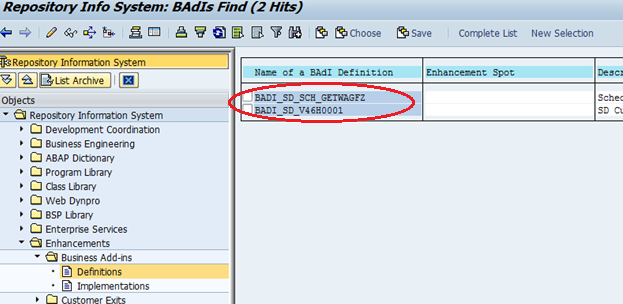
Go to Tcode SE84 à Enhancements àBADIs à Definitions.
Find the package for the Tcode for which you are finding the BADI.
Enter it as shown and hit execute:

Are we done yet ? Definitely not !
Let the questions come and lets keep on updating this blog.
I will update the blog with the following questions soon:
Question: Synchronous and asynchronous methods in BDC ?
Question: What is the difference between inner joins and outer joins?
Question: What is the difference between INSTANCE methods and STATIC methods?
Question: What is the difference between Implicit Enhancements and Explicit Enhancements?
Question: What is the difference between Enhancement point and Enhancement Section?
Question: How do you find Function Exit?
Question: How do you activate a Function Exit?
Welcome to yet another post on ABAP interview questions. Here I have complied a list of interview questions on Smartforms in SAP. This list is quite comprehensive. Hope you find it useful. Cheers !!
Smartform is SAP's print form technology and is an alternative to SAP-Scripts. Whenever you activate a Smartform , a function module is generated for that Smartform. The program that calls this function module is called the Driver Program for Smartform. The T.code for Smartforms is SMARTFORMS.
Unlike SAP-Scripts, Smartforms are client independent.
Here we go:
*An SAP R/3 system has 2 clients 800 & 810. You create an SAP Script Z_Script and a Smartform Z_Smartform in client 800. Will both Z_Script and Z_Smartform be available in client 810 as well?
Client 200 will have just the Smartform Z_Smartform and not the SAP Script Z_Script.
SAP-Script is client dependent whereas SMARTFORM is client independent. Many people don't understand what this is all about. The above answer should suffice. However, if you still do not understand this, find an SAP system where you have 2 clients. Create a dummy Smartform / script in one client and check whether they exist in the other client.
*You have created a Smartform in DEV environment. Then you migrated the Smartform to PROD environment. Will the name of the function module be same in DEV and PROD?
Once you transport the Smartform from DEV to PROD environment, a new function module name for the Smartform in generated in the PROD environment. For a particular Smartform , generated function module names are different in different systems.One can get the name of the function module for Smartform by passing the Smartform name to FM SSF_FUNCTION_MODULE_NAME.
Hence in the driver program for Smartform, it is common practice to use FM SSF_FUNCTION_MODULE_NAME and then calling the Smartform Function Module.
CALL FUNCTION 'SSF_FUNCTION_MODULE_NAME'
EXPORTING
formname = 'Z_SMARTFORM'
IMPORTING
fm_name = lv_fm_name
CALL FUNCTION lv_fm_name
*How do you convert a Smartform Output to PDF output?
There is a tricky solution here.But let's keep that for the last. Let us first discuss the conventional way of getting a PDF output for Smartform. For that you need to keep in mind the following two function modules and their importing/exporting parameters:
CONVERT_OTF
CONVERT_OTF_2_PDF
In the Driver program, import the parameter 'job_output_info' from the Smartform FM and utilize that info in 'OTF' parameter of the two aforementioned function modules.
Here is one more and probably the easiest way to see PDF output for a Smartform.
Type PDF! in the command prompt and hit enter :).

To see the Smartform Print Preview output as list output,
Type SLIS in the command prompt and hit enter.

*How do you achieve Bar Code printing in Smartforms?
Step1: Use SE73 i.e. SAP-Script Font Maintenance and create a Bar code say ZDEMO.
Step1: Use SE73 i.e. SAP-Script Font Maintenance and create a Bar code say ZDEMO.
Step 2: For Smartform, create a character format C1 and use the recently created Barcode ZDEMO.
It can be finally used to print Barcode as:


If you go to the properties of a page in Smartform, you will find a tab for Background Image.
Specify the source of the image you need here and it can be used as background image / Watermark in Smartforms.
Graphics can be maintained using T.code SE78.

How will you print on both sided of a Smartform?
At the Page level in Smartforms, you can find something called as Print Mode.
Set the Print mode to duplex to print on both sides of the Smartform.
What is the difference in a Table and a Template in Smartform?A Template has fixed number of Rows and Columns whereas a Table can have variable rows and columns i.e. you can have a internal table with contents associated to a Table element but not to a Template.
You should use a template when the tabular output is fixed!
You should use a template when the tabular output is fixed!
How do you achieve Page Protection in Smartform ?While one can use the PROTECT ..... ENDPROTECT command for SAP-Scripts, for Smartforms the Page-Protection checkbox can be used to ensure page protection:

Note: You have Page-protection property only for Text Elements in the Main Window.
Can you move a Smartform from one SAP system to another without using transports ?
Yes, this can be achieved using the Upload/Download feature for Smartforms.
One can download the Smartform from one system and save it as an XML file.
Once that is done, the XML file can be used to upload the Smartform in another system.
One can download the Smartform from one system and save it as an XML file.
Once that is done, the XML file can be used to upload the Smartform in another system.

Can you have a Smartform without a main window?
Yes, you can create a Smartform without a Main Window. But there is no need to do anything of such sort.
Whenever you create a Smartform, a main window is created by default. I can't think of a situation , where you will have a situation in which it is mandatory for you to remove the Main Window. But still I have seen this question in ABAP interviews. So I have put it here.
How do you find the name of the Function Module for a Smartform?
When is this function module created?
The function module for Smartform is created when the Smartform is activated.
You can find the name of the Function Module for a Smartform by going to
Environment --> Function Module Name.
What is a Copies Window?
What is a Final Window?
Final Window is called after all the other windows are called in a Smartform.
How do you pass data to Smartforms from the driver program?
How do you Debug Smartforms ?
How would you go about printing a logo in a Smartform?
How do you print address number in Smartforms ?
How do you print Symbols and Icons in Smartforms?
What are Basic Nodes and Auxiliary Nodes ?
What is the use of Folder in Smartforms ?
What is BDC and why do we use BDC ?
BDC ( Batch Data Communication ) also known as batch input is a technique by which large volumes of data can be transferred from Non Sap or Legacy systems to SAP systems.

Example: A Legacy system that is to be replaced by SAP has say 1000 Customers , 2000 vendors and 3000 materials. All this data needs to be transferred to SAP . In such cases , We can use BDC.
If the old system is replaced by SAP, such a transfer is called Conversion.
If the old system runs along with SAP, in that case the transfer is called an Interface.
If the old system is replaced by SAP, such a transfer is called Conversion.
If the old system runs along with SAP, in that case the transfer is called an Interface.
The two methods for BDC are:
- Session Method
- Call TRANSACTION Method
- CALL DIALOG (Outdated)
ABAP interview questions on BDC:
Important:
Question 1:What is the difference between Call Transaction Method and the Session method ?
Question 1:What is the difference between Call Transaction Method and the Session method ?
Session Method
|
Call Transaction
|
Session method id generally used when the data volume is huge.
|
Call transaction method is when the data volume is low
|
Session method is slow as compared to Call transaction.
|
Call Transaction method is relatively faster than Session method.
|
SAP Database is updated when you process the sessions. You need to process the sessions separately via SM35.
|
SAP Database is updated during the execution of the batch input program.
|
Errors are automatically handled during the processing of the batch input session.
|
Errors should be handled in the batch input program.
|
Important:
Question 2: How do you do BDC for a table control?
With other things as usual, there is a special trick that you have to use while doing BDC for table control.
You need to use the BDC OKCODE '=P+'.
Its the BCD_OKCODE for Page down that can be used for scrolling down in table control.
With other things as usual, there is a special trick that you have to use while doing BDC for table control.
You need to use the BDC OKCODE '=P+'.
Its the BCD_OKCODE for Page down that can be used for scrolling down in table control.
Important:
Question3: Is there any method apart from BDC for data upload to SAP?
Apart from BDC and LSMW, you can use BAPIs to upload data into SAP.
BAPIs should be preferred over BDCs, because they process data faster than BDC.
Apart from BDC and LSMW, you can use BAPIs to upload data into SAP.
BAPIs should be preferred over BDCs, because they process data faster than BDC.
A BAPI is faster since it updates Database "directly". Whereas BDC calls transaction and goes through the whole screen sequence as any user would do.
BAPI
|
BDC
|
BAPI is faster than BDC.
|
BDC is relatively slower than BAPI.
|
BAPI directly updates database.
|
BDC goes through all the screens as a normal user would do and hence it is slower.
|
No such processing options are available in BAPI.
|
Background and Foreground processing options are available for BDC.
|
BAPI would generally used for small data uploads.
|
BDCs would be preferred for large volumes of data upload since background processing option is available.
|
For processing errors, the Return Parameters for BAPI should be used.This parameter returns exception messages or success messages to the calling program.
|
Errors can be processed in SM35 for session method and in the batch input program for Call Transaction method.
|
Question 4: How do you process errors in Call Transaction method ?
Let's have a look at the syntax for CALL TRANSACTION method.
Sample code:
DATA: BEGIN OF G_T_MESSTAB OCCURS 0.
INCLUDE STRUCTURE BDCMSGCOLL.
DATA: END OF G_T_MESSTAB.
CALL TRANSACTION 'MB11'
USING G_T_BDCDATA
MODE 'E'
UPDATE 'S'
MESSAGES INTO G_T_MESSTAB.
All the error messages will be trapped inside G_T_MESSTAB.
Question 5: What is the use of program RSBDCSUB?
There are two ways to process the BDC sessions:
1) Go to SM35 ---> Choose session ---> hit process.
Now See Question no. 10.
2) Use program RSBDCSUB.
RSBDCSUB schedules the session to be processed in background.
Let's take an example to understand this.
The sessions are created at one point of time and processed at other point of time and this may create a problem: For example: a BDC program creates a session for updating 1500 customers in SAP. However , before this session is processed via SM35 , a user inserts 100 customers in the system manually. In this case , the session will have at least 100 errors when the session is processed from SM35.
One way to avoid this is to use the program "RSBDCSUB" in the batch input program itself so that the session is processed as soon as it is created.
RSBDCSUB schedules the session to be processed in background.
There are two ways to process the BDC sessions:
1) Go to SM35 ---> Choose session ---> hit process.
Now See Question no. 10.
2) Use program RSBDCSUB.
RSBDCSUB schedules the session to be processed in background.
Let's take an example to understand this.
The sessions are created at one point of time and processed at other point of time and this may create a problem: For example: a BDC program creates a session for updating 1500 customers in SAP. However , before this session is processed via SM35 , a user inserts 100 customers in the system manually. In this case , the session will have at least 100 errors when the session is processed from SM35.
One way to avoid this is to use the program "RSBDCSUB" in the batch input program itself so that the session is processed as soon as it is created.
RSBDCSUB schedules the session to be processed in background.
Question 6: What is the structure of the BDC table?
The BDCDATA consists of the following fields:
§ PROGRAM [CHAR 40] - Online program name.
§ DYNPRO [NUMC 4] - Screen number.
§ DYNBEGIN [CHAR 1] - Flag to indicate the start of a new screen.
§ FNAM [CHAR 132] - Field name of a screen field to be filled with data.
§ FVAL [CHAR 132] - The actual value to be filled into the specified screen field.
Sample Screenshot:
Sample Screenshot:
 |
| BDCDATA table structure |
Question 7: What is the difference between BDC_OKCODE and BDC_CURSOR?
BDC_OKCODE: is used for storing commands during the recording. like '/00' is the command for 'ENTER' Key.
BDC_CURSOR: contains the cursor position. it contians the field in which cursor will be.
Example code:
perform bdc_field using 'BDC_CURSOR'
'PROJ-PSPID'.
perform bdc_field using 'BDC_OKCODE'
'=BU'.
Question 8: What are the 3 methods that we use in sequence in a Batch input session method ?
1) BDC_OPEN_GROUP for opening the Batch Input Session
2) BDC_INSERT for inserting the transactional data into SAP
3) BDC_CLOSE_GROUP for closing the Batch Input Session

If there are n records , the BDC_INSERT method should be called n times.
BDC_OPEN_GROUP and BDC_CLOSE_GROUP are called only once.
General Information about a session is stored in table APQI.
Transaction data for a session is stored in table APQD.
Question 9: What is your approach for writing a BDC program?
Identify the Tcode and do the recording in SHDB to populate the BDCDATA.

Once the recording is done , one can Transfer it to the Batch input program.

In the batch Input program , The transactional data is read from the file to an internal table.
Then one can loop over the transactional data in the internal table and start uploading the data in SAP either by CALL TRANSACTION method or by creating sessions through the batch input program.
Question 10: How do you process errors in Session method ?
You can go to Transaction SM35 , Choose the session name and click on Process.

Question 11: What are the different modes of processing batch input sessions?
The three modes are:
Foreground
Display Errors Only
Background
Question 12: What is the difference between Synchronous and Asynchronous Update ?
In Synchronous update , the database is updated before the next transaction is taken for processing in a batch input.
In Asynchronous update , the system doesn't wait for updating the database before the next transaction is taken for processing in a batch input.
Question 13: What is the transaction for Recording BDC ?
The Tcode is SHDB.
Question 14: How do you read files from the Application server ?
Question 14: How do you read files from the Application server ?
You can use the commands:
OPEN DATASET ---> opens the file(dataset) either in read /write mode.
READ DATASET ---> Read the file
CLOSE DATASET ---> Close the dataset once the date has been read .
Question 15: How do you read files from the presentation server ?
OPEN DATASET ---> opens the file(dataset) either in read /write mode.
READ DATASET ---> Read the file
CLOSE DATASET ---> Close the dataset once the date has been read .
Question 15: How do you read files from the presentation server ?
You can use the Function Modules :
GUI_UPLOAD --> To read data from file into an internal table
GUI_DOWNLOAD --> To write data from internal table to a file on presentation server
GUI_UPLOAD --> To read data from file into an internal table
GUI_DOWNLOAD --> To write data from internal table to a file on presentation server
